If CloudJoi is managing your event’s refunds (the default setup), here’s what the full process looks like — from announcement to payout.
🪜 Step-by-Step Refund Flow
-
Event Cancellation Confirmed
Organiser notifies CloudJoi support and agrees to CloudJoi-handled refund -
CloudJoi Sends Refund Announcement
Patrons are notified by email (usually 1–2 days before the event) -
Refund Window Opens
Patrons either:-
Are auto-refunded (if paid by credit/debit card)
-
Submit a refund request form (if paid by online banking)
-
-
Refund Request Form Closes
CloudJoi reviews and verifies refund requests submitted on time -
Refunds Processed
-
Card refunds go back to the original card automatically
-
Bank transfer refunds are processed manually
-
-
Patrons Notified
Confirmation email is sent once the refund is completed -
Final Refund Report & Invoice Issued
CloudJoi provides a breakdown and invoice for your records
📅 Typical Timeline
-
Submission Period: Usually 5–10 days from the announcement
-
Processing Period: Starts once request window closes
-
Refund Completed: Within 30 days of cancellation
🗓 Exact dates vary by event — see your event’s refund schedule.
💰 Fees & Deductions
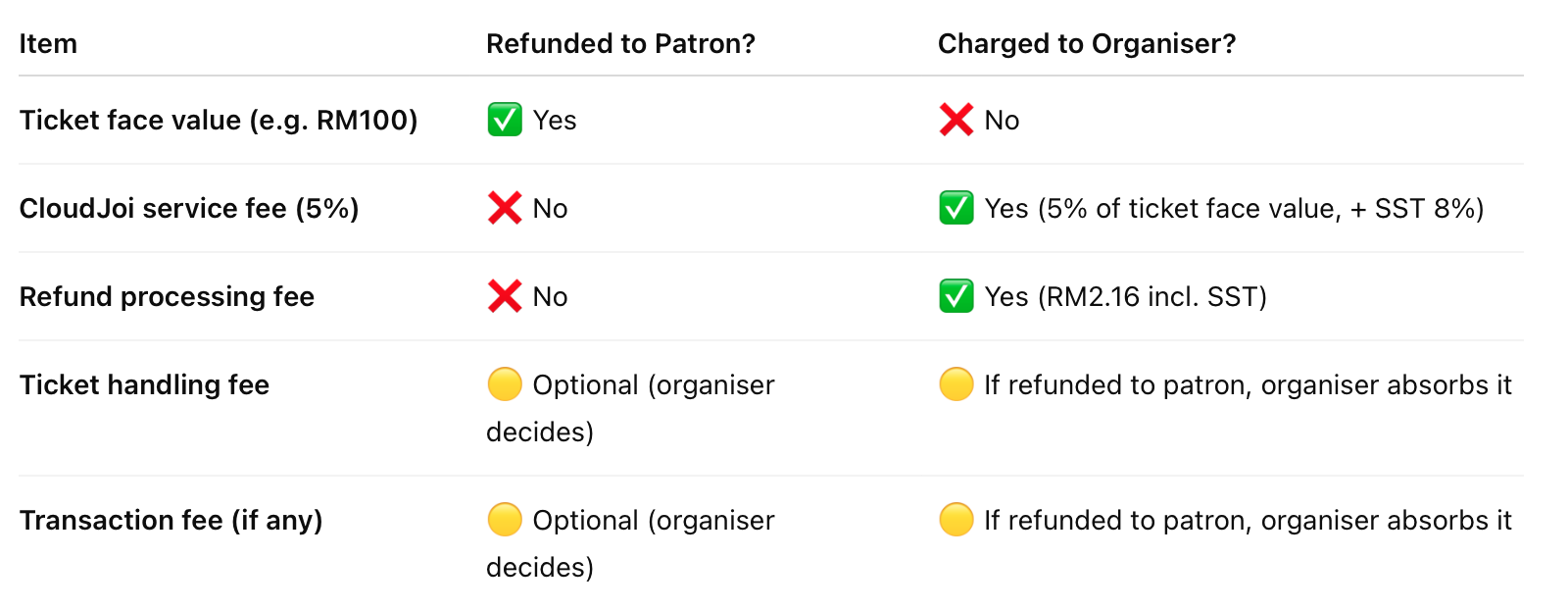 📝 Total refund to patron is RM100 (not RM104.32). Patron-paid fees (RM4.32) are not refunded unless the organiser requests it.
⚠️ Missed the Refund Window?
If a patron misses the refund deadline:
-
CloudJoi may still process their refund on a case-by-case basis
-
This depends on whether funds are still withheld or already settled