Not all cancellations are full cancellations. Sometimes, only part of your event is affected — or you may be rescheduling it to a later date.
CloudJoi supports refund flexibility for these situations.
🎭 Common Scenarios
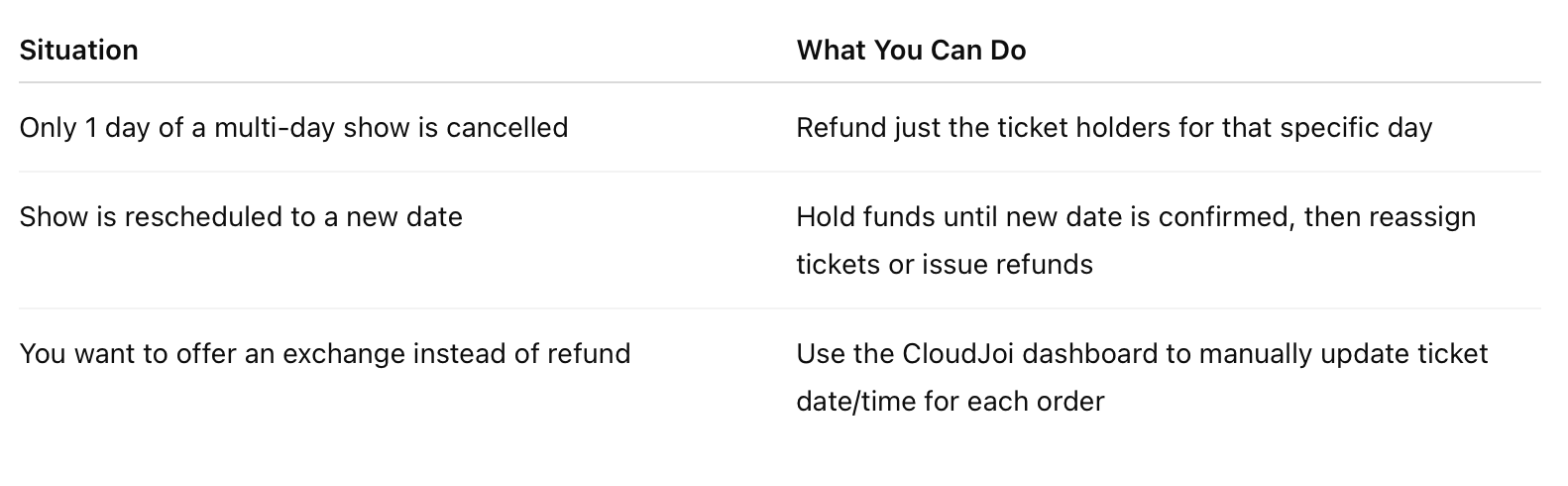
🔁 Rescheduling an Event on CloudJoi
-
Go to your event dashboard
-
Locate the affected ticket orders
-
Change the showtime/date for each order manually
-
Click Resend Email to notify the patron of the new schedule
-
If patron rejects the new date, they may request a refund (handled via standard refund process)
📝 We recommend announcing the new date and refund options together to avoid confusion.
💸 For Partial Refunds
You can choose to refund only the affected orders:
-
CloudJoi will filter refund requests by ticket date
-
Patrons from unaffected showtimes will not be included in the refund batch
-
Standard fees apply if CloudJoi handles the refund
💬 Communication is key
-
Clearly specify which dates are cancelled or rescheduled
-
Remind patrons to check their email for instructions
-
For rescheduled shows, highlight exchange options or refund deadlines