To receive ticket sales payouts, you’ll need to add at least one verified bank account to your organisation profile. This is where CloudJoi will transfer your settlement after each event.
🪜 How to Add a New Bank Account
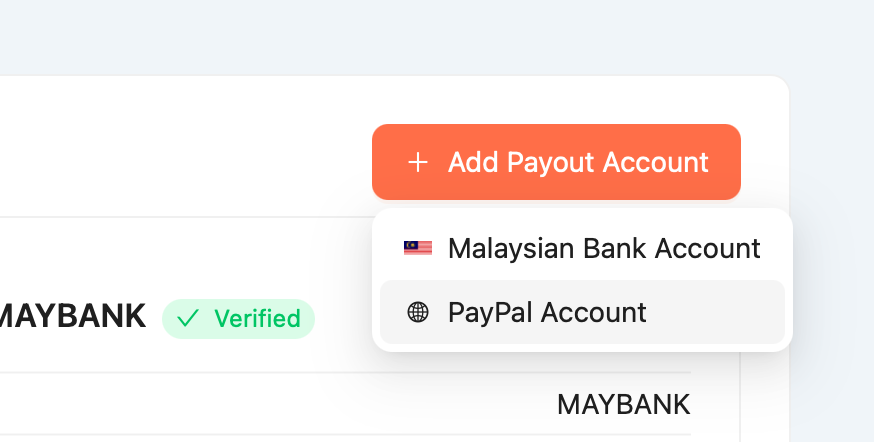
-
Click “Add Bank Account”
-
Enter the following details:
-
Account Holder Name (must match your organisation name or your legal ID)
-
Bank Name
-
Bank Account Number
-
-
Click Save
Your account will appear in the list of available payout options.
🔄 How to Change Your Bank Account
-
In the Payout Account tab, click the three-dot menu next to the current account
-
Select “Edit” or “Remove”
-
Add your new bank account using the steps above
-
Choose the correct bank when confirming settlement
⚠️ Important Notes
-
Starting July 2025, due to Malaysia's e-invoice regulation, you may not be allowed to change payout accounts freely
-
Make sure the account name matches your registration — mismatches may delay payout
-
You can store multiple accounts, but only one is selected per settlement
-
If no account is selected during confirmation, payout cannot proceed
🌍 For Non-Malaysian Organisations
If your organisation is not based in Malaysia or using a non-MYR currency, payouts are made via PayPal.
How to Set Up PayPal for Payout:
-
Choose “Add PayPal Account”
-
Enter your PayPal-registered email address
-
Click Save
💡 Make sure your PayPal account is verified and can receive payments in your selected currency.
⚠️ Notes for International Payouts
-
PayPal fees may apply (based on their local transfer rates)
-
CloudJoi is not responsible for conversion or receipt issues on unverified PayPal accounts
-
Always double-check your email for typos — incorrect addresses may result in failed payouts
🧾 Where to See Past Payouts
Go to [Event Name] > Finance > Settlements
There, you’ll see:
-
Amount paid
-
Bank used
-
Payout status (Pending, Processing, Completed)
-
Download Invoices/Settlement Report/Sales Report