Not all ticket tiers go on sale at the same time — and that’s the point. Maybe your “Early Bird” ends a week before “General Admission” starts. Or your VIP seats close earlier due to printing needs.
In CloudJoi, each ticket tier can have its own sales start and end time, giving you total control over when and how each option is available.
📍 Where to Set Sales Windows per Tier
-
Go to Settings > Ticketing
-
Under Timings & Prices, find your event date and showtime
-
Expand the timing to view the assigned tiers
-
Click the edit icon (🖉) next to the tier
-
Set:
-
Sales Start Date
-
Sales End Date
-
Limit (optional — more on this below)
-
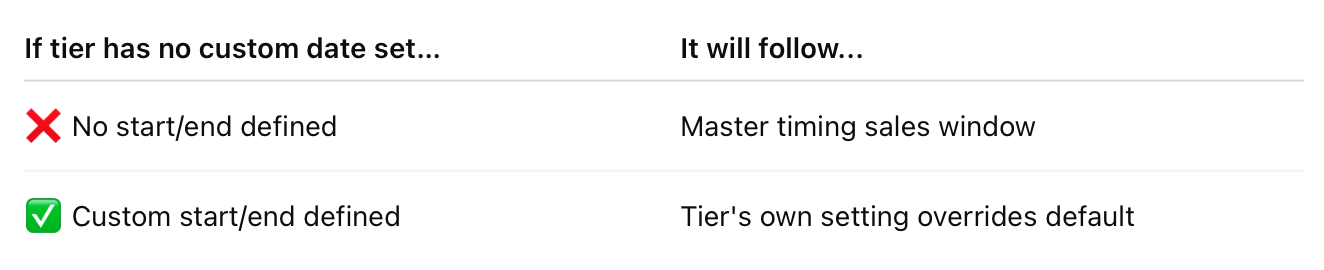
If you don’t set specific dates here, it will inherit the sales window from the master event timing.
🚦 Tier Limits Explained
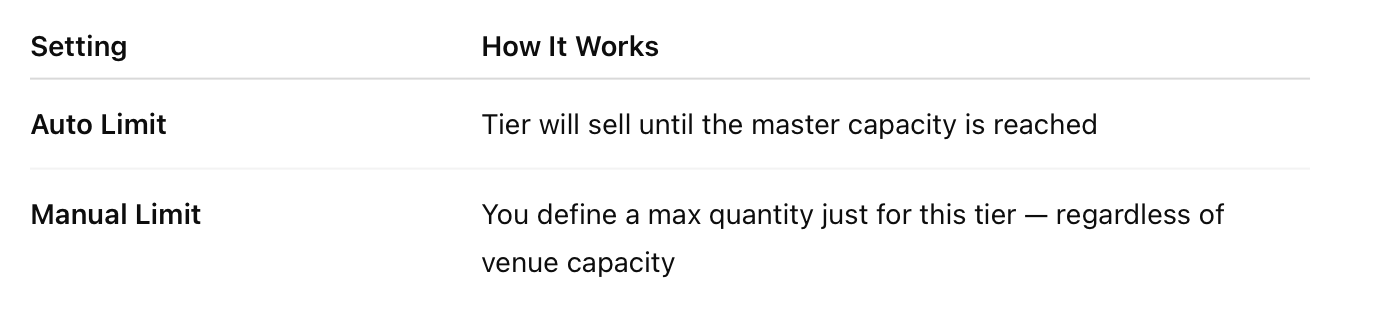
Example:
A show has a total capacity of 500 seats.
-
VIP is limited to 100
-
Standard has auto limit
Once VIP sells out, only Standard tickets will remain available — even if the full 500 isn’t yet sold.
🧠 Inheritance Logic
✅ Why This Matters
-
Run Flash Sales on selected tiers
-
Offer early access for patrons with private links
-
Manage multiple tier expiry windows cleanly