When you set up your event’s seating or capacity, there are two levels you’ll need to balance:
-
Master Capacity — the total number of people your venue can host
-
Tier Capacity — the limit for how many tickets can be sold per ticket type
Understanding the difference helps you avoid overselling or underselling certain tiers.
🏟️ What is Master Capacity?
This is the total seat limit for a specific event timing.
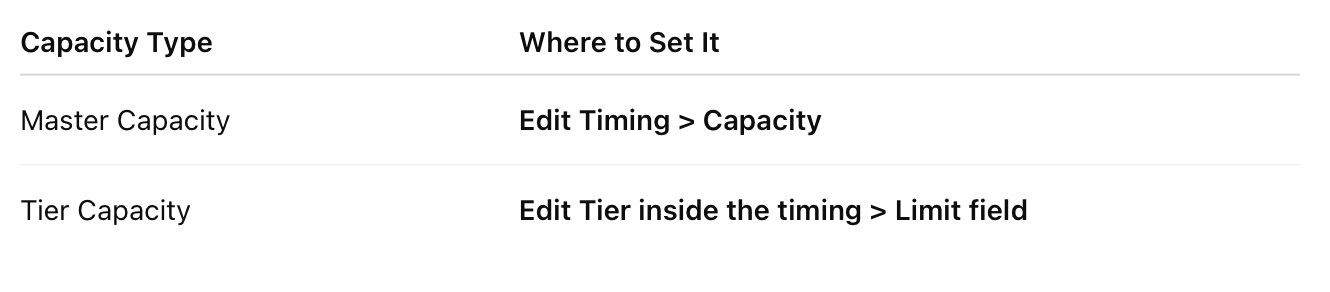
It’s set when editing a Timing under Settings > Ticketing.
You can find it here:
Settings > Ticketing > Timings & Prices > Edit Timing
Example: If your venue holds 500 people, your master capacity = 500.
🎟️ What is Tier Capacity?
This is the maximum quantity of tickets that can be sold for a specific tier (e.g. VIP, Standard).
You can:
-
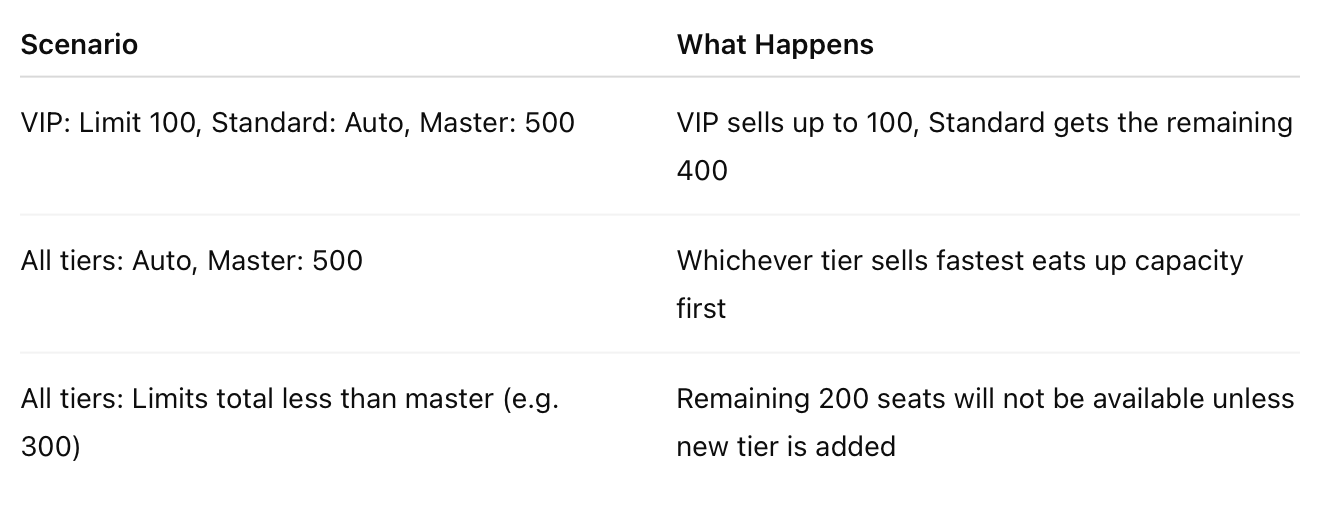
Leave the tier as “Auto” (no hard cap; it sells until master capacity is hit)
-
Set a manual limit (e.g. “only 100 VIP tickets allowed”)
💡 If two tiers are both set to “Auto” and your event has a master capacity of 500 — the two tiers will share that pool dynamically.
🧠 How They Work Together
📍 Where to Set Each
🚫 Oversell Protection
Even if all tiers are Auto, CloudJoi will not allow you to sell beyond master capacity.