CloudJoi supports multiple pricing modes depending on your event goals — from standard paid tiers to fully free or manually issued complimentary tickets. But not all RM0 tickets are created equal.
This article breaks down the difference between what the system sees as a Free, Complimentary, or Paid ticket — and how each behaves in reporting, capacity, and invoicing.
💵 1. Paid Tickets
These are the default ticket types with a set face value above RM0.
Features:
-
Visible during checkout
-
Triggers payment gateway
-
Shows up in revenue reports
-
Service fee + ticket handling fees apply
-
Refundable if allowed by organiser
✅ Tip: These are what most audiences expect. Just set a price when adding/editing the tier.
🎟️ 2. Free Tickets (RM0 Value)
If you set a tier price to RM0, it becomes a free public ticket.
Features:
-
No payment required
-
Auto-issued with confirmation email
-
Still counts toward venue capacity
-
Shows up in sales report, but not as revenue
-
Patrons can "buy" these without restriction unless you set a limit
⚠️ Don’t confuse RM0 tiers with Complimentary orders — they’re different.
🆓 3. Complimentary Tickets (Manually Issued)
Issued only via:
Orders > Add Order > Select “Complimentary”
Features:
-
Labelled “Complimentary” on ticket
-
No value tied (even if tier price is normally RM50)
-
Does not show up in revenue
-
Only available through the organiser backend
-
Can be voided if needed (unlike paid tickets)
🔒 Use this for partners, performers, invited guests — it’s not publicly accessible.
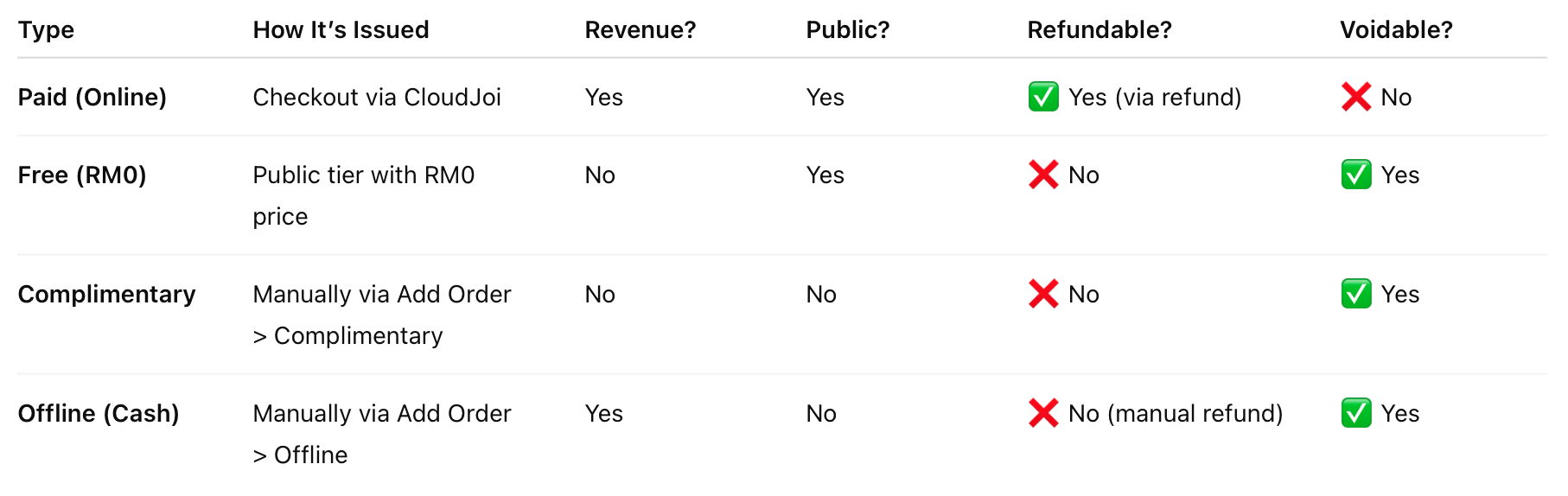
🧾 Summary Table
🧠 When to Use What
⚠️ Free tickets (RM0) are voidable by organisers if needed — unlike online paid tickets, which must go through a refund process.